Friday, March 23, 2012

Shades of red


A rain-drenched figure slowly ambled towards the Tharawad house. His ebony-coloured torso covered only by a small waist clothe, the big knife in his waistband merging with his complexion. He stopped at the steps of the palatial mansion.
The sound of water gushing from the roof filled the intervals of silence between each clash of thunder.
“Thambra. Thambra,” he called out, raising his voice slightly to be heard above the sound of the deluge.
The massive rosewood door opened with a loud creak, bringing to view a stout man in his late forties. A long chain of gold-covered Rudrakshas hung from his neck and rested on his belly. The verandah slowly filled with his presence.
The man bowed at the sight of his master. “Why did you call for me Thambra?”
“So, you will come if I call, won’t you, Paramu.” There was a touch of cynicism in the voice of the potbellied landlord.
“Why do you say so master, haven’t I always obeyed you.”
“Then, why didn’t you come when I sent for you yesterday.”  
“Yesterday…master…I had gone to attend a meeting in town.”
“Oh O! So who will climb the trees when our local leader is away, me?”
“No Thambra, I didn’t mean that…it’s just that Comrade Kutty insisted and I couldn’t say no.”
“You too went to hold flags. Who do you think you are going to become…that bearded German Sahib.”
“ No, Thambra. I’ll make up today.”
“Oh no, you won’t. You won’t climb my trees anymore, nor do I want you hanging around my land.”
“But you can’t send me away like that, my party will oppose it.”
The master’s eyes twitched, and with a single move he threw the heavy betel box at Paramu. The wiry coconut-climber fell on impact, blood gushing from his forehead and reddening the sand.

The old man woke up drenched in sweat. The bed was nearly soaked. For the past thirty years this very vision had haunted him day and night, reminding him of that one moment of impulse that had ruined his life.

The town was crowded that day. There was a meeting of the party. The streets were awash in red, toddlers tottering with small red flags in their hands…some sporting red berets. Festive mood was in the air.
Some distance away, the old man walked slowly towards the river. It’s been nearly three decades since he started coming here to feed the fish. It was one of those joyous concessions he allowed himself. Somehow, all the pandemonium in the street failed to catch his attention. Songs of the “Revolution” flooded the calm Saturday evening. A sea of red was slowly approaching the riverbank.
The din of crackers startled the man; he slowly turned around only to gape at the choreographed march of the cadres, all draped in red. His eyebrows started twitching and his palms sweated. His fear of the party and all things red was once again overwhelming.
The distance between him and the army of people became smaller. He could now see the fists held high and moving in unison to the aggressive drumbeats.
His eyes slowly lost focus and he cried out. His wails drowned in the drone of the slogans. He pushed in the air, as if to keep someone away. He ran into the red-hued procession, shouting at the top of his time-ravaged voice.
No one noticed him though; he had strangely become a part of the scenery. He lost his footing and fell between the multitudes of feet. Some trampled upon him. 

The sound of metal echoed in the corridors as door to the cell was opened. Soon, the silence returned to its deafening self.
The old man grew restless and writhed about in his bed. Perhaps, the silence had been too loud for him. A buzz filled the room as a small apparatus beside the bed as turned on. A doctor pressed a metal band onto the man’s head. The sound became louder as electricity started flowing through the coils. The man fell back in his bed, his mind blank. Then a scream from the past woke him up!

“Come out you bourgeoisie pig.” 
“How dare you call me that, don’t you know who I am,” the Thambra was furious.
“Yeah, we all know. Our visible god! The owner of all his servants! Is it not, you wretched tyrant?” it was Comrade Kutty’s voice.
Just then a man rushed in and dragged the Thambra out of his house. The man had a badly bruised forehead. It was Paramu.
“Thought I was dead didn’t you, Thambra!”
“Paramu don’t do that,” the words stopped in his throat.
The cries only fell on deaf ears. A ball of fire fell on his house, engulfing it in flames.
A moment of calm, and then there were shouts of panic as many teemed out of the burning house. Some, however, never made it; among them the Thambra’s three daughters.
The Thambra knew it was all over. His land, his power – all lost in an explosion of suppressed rage.

The asylum cell was calm, the silence unnerving as usual. The red light from the corridor filled the room. The old man bathed in crimson hue, as he lay motionless on the steel bed. His eyes twitched one last time. Maybe he was having visions…then everything was still again. 
The red light appeared like a shroud over the Thambra’s body.

Thursday, April 7, 2011

Over a million facebook users sign up for bogus event


An event on Facebook called "Who blocked you from his friend list?" has seen 165,000 users signing. A whopping 10 million users are still mulling over whether they should attend. The only catch here is that there is no such even. 
IT security and data protection firm Sophos has issued a warning for Facebook users, asking them to careful while signing up for the event and other bogus events like it.
“Spammers have invited millions of Facebook users to fake events in an attempt to generate income from online survey scams. The scammers embed instructions into the 'More info' section of the event's summary, which leads unsuspecting Facebook users into visiting webpage's for online surveys or competitions, designed to earn commission for those behind the scheme. In some instances, users are also asked for a mobile phone number - which is then signed up to an expensive premium rate service,” says a press note released by Sophos on Friday.
"These spammed-out event invitations and links to survey scams are one of the biggest nuisances on Facebook right now, impacting millions of users every day," said Graham Cluley, Senior Technology Consultant at Sophos. "It would be great if Facebook was being more proactive in shutting down these obviously bogus events, as currently it's far too easy for the scammers to fill their pockets through schemes like this."
Facebook users are reminded never to accept unsolicited invitations from suspicious events, and always think twice about clicking on links received via Facebook. But still many click on links posted on their walls and end up sending similar links or embarrassing wall posts to all on their friend list. 

Saturday, February 5, 2011

New mail scam

The scamsters seems to be getting more and more ingenious. The mail, thankfully in my junk, is from the FBI, dutifully informing that I have a few million dollars waiting for me.

We believe this notification meets you in a very good state of mind and health. The FEDERAL BUREAU OF INVESTIGATION (FBI) Washington, D.C United States of America in conjunction with some other relevant Investigative Agencies here in the USA have recently been informed through our Global intelligence monitoring network that you have a pending FUND transaction with a Bank regarding to an over-due Inheritance / Award payment which was fully endorsed to be paid in your favor.
It might interest you to know that we have taken out time in screening through this whole transaction as stipulated on our protocol of operation.

So, beware. Hope you all have your spam protectors ready.

Saturday, October 2, 2010

Stupid box no more


Home entertainment has taken a sudden detour into unknown territory.
I was born in a VCR-less household. And in the ’90s, that was one of the worst things that could happen to you. There was a way to redeem your esteem among peers, though — the video rental. It didn’t mean renting home some VHS cassettes; it meant bringing home the entire rig that went with it. But to rent a VCR or VCP for 24 hours you also had to do some serious number crunching:
24 hours = seven Hindi movies or up to 12 English movies, or a combination of both, with a strong preference for the latter.
Then came a decade when the ritual was repeated with more compact players and CDs. This was followed by the DVD revolution and in a couple of years owning a player became cheaper than watching a movie at a swanky mall. As we started settling down, the cat was back to bother the pigeons: the Blu-ray had arrived. 
Everyone waited for this new, “well-capacitated” technology — a Blu-ray disc stores double of what a regular DVD can — to become affordable and, more importantly, its content to become widely available. It seems like that phase is never going to come. And even if it does, nobody will really care. For home entertainment has taken a detour from what we thought was its path to a logical conclusion.
As Blu-ray got bogged down by a lack of patronage from the big tech companies, especially Apple and to some extent Microsoft, the focus shifted to other options of getting content into your TV. 

Content out of a box
The clear winner now is data downloaded (almost always illegally) from torrents and peer-to-peer data-sharing networks. Those who are into this small-scale piracy prefer to buy large storage devices to stack up on movies which otherwise would have never made it to DVD stores in our country. Gadgets like the Amkette Flash TV let you play multiple formats on your television effortlessly. But this method, despite its popularity, seems unlikely to have a long run, unless companies decide to make their content available online, either for free or by charging a small premium, with stress on “small”.
But then technology has moved on and you can get the internet on your TV now. One way to do it would be by buying an internet-enabled TV. Some models like the VU Intelligent TV, which let you surf the Net on your TV and watch streaming content, have already made it to Indian stores.
The second method is slightly complicated and strictly for geeks, unless you pay someone to set it up for you. In this, you will configure your computer to stream content, either wirelessly or through cable, to your TV. However, the drawback will be that you will need to run to your PC or laptop for the controls.
Direct to Home and Internet Protocol television, both gaining popularity in our country, also let you access a lot of movies and other content on demand. Though with a limited content base, this method is preferred by many as it is the easiest to use. 

Going online
What could be the future for the Indian consumer is already making waves in the US and Canada. Netflix, which made its name and money by home-delivering DVD and Blu-ray discs ordered online, is reinventing itself with video streaming. Its “Watch Instantly” option lets users stream content — with pause and play — to the computer or TV, though only a fraction of Netflix’s huge library is available for streaming now. Moreover, subscribers on monthly packages don’t have to pay an additional fee for watching movies online. Apple too has plunged in with its own version of streaming. 
Now, With Apple TV, Steve Jobs is trying to beat Netflix at its own game. The challenger is a small digital media receiver that can play digital content originating from iTunes Store, Netflix, YouTube, Flickr or MobileMe on a widescreen television via Apple’s patented AirPlay technology. While the device is sold for $99, users have to pay extra for the content they watch.
So, while internet seems to be the new breath of life home entertainment has been gasping for, it won’t be long before the winds of change leave it breathless again.

Monday, September 27, 2010

Pint-size punch

HOLDING the Samsung HMX-H200 in my hand, I could not help but wonder how the video camera has shrunk over the years. A couple of decades back, a video camera would need an array of boxes of all shapes and sizes to carry it along with other paraphernalia — it could not be transported in anything smaller than a car. At weddings and other functions which needed to be recorded for posterity, the video cameraman was the chief guest, often dictating how the function should proceed.
Now, however, the video camera is a camcorder not bigger than your palm and still packs far more features than what its VHS ancestors could do. The H200 for instance is small and compact enough to come within the grip of a six-year-old, but it still has a 1920 x 1080 60i Full HD resolution recording and a top of the range 20x optical zoom.
To make sure that the HD and super zoom are exploited to their full potential, the camcorder also boasts of a Schneider Kreuznach lens equipped with Smart OIS (Optical Image Stabiliser). The Smart OIS eliminates the effect of shaky hands or body movement, especially when in maximum zoom, with minute shifts of the lens. It also helps that Samsung has thrown in a 1/4.1” 3M Pixel back side illuminated CMOS Sensor, which is far more sensitive than conventional CMOS sensors, thus reducing noise and distortion. The sensor also works wonders in low-light conditions. 
The camera can also be used to click stills at a decent 4.7 mega pixel, which I thought was slightly below par for a camera which has HD capability. But, interestingly, this feature can be used for time-lapse recording by presetting the camera to click at specific intervals and piecing the images together.
I liked the fact that the camcorder switched on by itself every time the LCD screen was opened. The touchscreen LCD has a very convenient menu, which can also be accessed with the buttons on the body. The interface is intuitive and tells you if the light is low and if the camera shutter has not been opened. This also means you can just touch on the screen to tell the camera where to focus. Talking of focus, the Smart Auto function sets automatically sets up the camera parameters depending on the scene.
Another user-friendly feature is that there are two ways to do most functions, users can just choose which way they like to do it. Then you don’t need to install a software on your PC to access or edit the videos as the built-in Intelli Studio software will take charge as soon as you plug the camera on to a PC through the USB.
But, Samsung could have added a small LED flash to go with the camera, but I guess that would have used up a lot of power. In fact, the H200 claims it can shoot up to two hours without a recharge, enough for you to record a full football match or one of those lengthy Indian weddings. The H200 is completely dependent on the SDHC card for storage, while its costlier siblings like H203, H204 and H205 have built-in solid state drives.
Overall, the H200 is a great buy at Rs 19,000.

Saturday, September 25, 2010

The Mobile Navigator

The Google maps app for mobile leaves you with no excuses for getting lost.
 
Stuck in a train which just refused to reach Delhi, I started fiddling with the apps on my Nokia E63. Curious to know where I was, I switched on the Google Maps app which I had downloaded recently. My phone doesn’t have GPS and I was definitely not near a city from what I saw through the blue glass windows, yet the app plotted my exact location on the map — I was 20 km from Aligarh. As my fellow passengers tried to figure out where we had been stuck for the past two hours, I chipped in with my gyan, much to their surprise.
But the Google Maps app for mobile phones can get you far more than some brownie points on a forgotten Indian Railways express train. For instance, users in Delhi can get the app to show them how to get from Point A to Point B by the Metro. Along with telling you how much the journey will cost and how long it will take, the app also uses your location to direct you to the nearest Metro station. Sadly, I could not get the app to work in Kolkata, the other Indian city with a Metro network, or Mumbai which prides itself on its local train system. 
The app will, however, tell you road directions for anywhere in India. It plots the route on a map and gives you directions for the entire journey, telling you where to turn or which overbridge to take. In the big cities, it automatically factors in the traffic delays and tells you how long it will take to reach the destination—the accuracy of this feature is debatable though. It can also plot alternative routes, in case you are stuck in a traffic jam. As a third option, you also get to know the shortest walking route with detailed directions.
In phones with built-in GPS, the Google app can give other navigation devices a run for their money, with its voice output that reads out directions. As default the app shows locations on a map, you also have the option of switching to satellite view.
But the best feature of the app for me was its ‘My Location’ technology which shows where you are on a map using the nearest cell phone towers. This was correct to a few metres every time I checked, even in interior Uttar Pradesh and Jharkhand.
The app lets you use keys on your phone to zoom in on the map and find businesses that have been tagged, but there are not many tagged in Indian cities for now. In the US, the app can plot all the nearby restaurants and even pop up their contact details. In India, you can use the ‘Layers’ feature to see important marking on the map like airports, transit lines and so on.
Google Latitude, which lets you log in to your Google account and tell the world where you are at any given point of time, is also a part of the app. However, it is best left switched off in order to avoid embarrassing situations.
While the features available depend on the phone OS and your location, most basics are available on all phones. The good thing about this app, which is free like other apps from Google, is that you don’t actually need a smart phone to get it going. It works like a dream on cheaper phones too, provided you have a GPRS or WAP connection.
So, you don’t have an excuse for getting lost any more.

Monday, September 13, 2010

Being Net Savvy

Are you sure you need a notebook, or will a cheaper netbook work better?

BEFORE buying a laptop, most of us have grand plans about what we want to do with it — maybe, write a book, shoot a video and edit it into a movie, bring home spreadsheets from work and reduce your burden in office. But once we get hold of a laptop, all the plans die an easy death and we end up using it for surfing the Net, watching movies and playing games. It could be a couple of years before you realise that some of the programmes, and even the DVD writer, are still in mint condition.
Actually, what most of us need is a much-cheaper netbook and not a full-fledged notebook. Something that lets you connect to the Net seamlessly, lets you listen to music and watch movies, play games, write new posts for your blog and do other light-weight stuff, all things you can do without lugging around a laptop that weighs nearly 2 kg. 
In fact, netbooks these days have become more Net savvy. Companies have started realising the key requirements of their users and clustering them together, pushing the other, boring or underused functions and applications behind the scenes. Here is a look at two netbooks that have evolved for the better.

The Lenovo S10-3s: S10 IdeaPads have been Lenovo’s netbook workhorse for a few years now, but the third generation likes to flaunt what it likes to do best. In fact, just beside the 10.1" LED backlit screen is the Quick Start (QS) button which takes you to online in under 20 seconds —yes, I timed it. The screen that pops up is not the Windows 7 on which the 3s works, but Lenovo’s proprietary Quick Start application which looks a bit like the desktop of the Mac OSx. Below it is a bar that links to applications most-used like Facebook, Orkut, Flickr, Gmail and Skype. You can add or remove the apps from the collection provided, or get your own if you know the URL.
To go online on this mode, you will need a Wi-Fi, LAN, DSL connection—I had trouble getting it to work on the Tata Photon. You can always use data cards by switching over to the Windows OS. But on Wi-Fi – you can always plug in your data card into a router – the QS mode works like a dream.
Even without the QS, the S10-3s is a good netbook, certainly the most stylish in this price range. It is a tad smaller than regular netbooks and weighs just 1.1 kg with the 3-cell battery. It comes with an Intel Atom N450 processor, up to 2GB DDR2 memory, 240 GB storage, three USB ports and a 5-in-1 card reader. The all-white full-size keyboard is among the best I have seen in a non-Mac laptop and has an ease-of-use factor only people who spend over 10 hours a day in front of computers will be able to describe. The S10-3s has built-in protection against drops and falls as well as a one-touch backup button.
To make space for the keyboard, the speakers have been pushed under the body, which muffles the sounds to a great extent. As the netbook has a Dolby headphone certification, it is better to buy a good pair of earmuffs along with it. The touchpad is cool, but not multi-touch, so you will have to adjust a bit if you are used to pinching and flipping on your larger notebook. But, what all do you need for Rs 19,625?

Samsung N210: The N210 is also a Windows 7-based netbook. Once you boot up the OS, there is the option of switching to the Hyperspace mode, ideal if you just want to surf the Net, and maybe jot down some notes. This mode fulfills most of your computing needs provided there is a Wi-Fi connection for it to play around with. The main page has tabs to your favourite websites and pages, shortcuts to Realplayer, a browser and even a very handy notepad. It also gives you one-touch access to your mail accounts and social networking sites as well as news applications. You can also change the layout of the page, and add or remove shortcuts as needed.
Inside is an Intel Atom N450 processor, 160 GB storage, and 1 GB DDR2 SDRAM. The N210 comes with a full-size all-black keyboard and a touchpad with separate left-right clicks. The speaker is among the best you will find in a netbook and gels well with the 10.1” display.
Though slightly on the heavier side at 1.34 kg, the N210 promises around 11 hours of juice. But there seems to be no one-touch access to the Hyperspace mode, which is actually a waste of a very good idea.
Then, the designers don’t seem to be all that good with buttons, for I had some serious trouble locating the main power button – good thing you only have to find it once. Overall a good buy for Rs 20,952.

Sunday, August 8, 2010

Bada: An ocean of opportunity

Samsung does not consider the Android taboo. The Korean company has also experimented with Symbian and Windows on some of its phones. But it seems the company thought it was time it had an operating system of its own for good measure. Hence, the bada — meaning “ocean” in Korean — Samsung’s “driving force in accomplishing its vision of a smartphone for everyone”.
The Samsung Wave runs on the bada.
“The bada has a specific role. It is not for competing with other platforms, but for providing the value of smartphone to more customers. This means that, unlike other platforms that typically require high specification of hardware, bada is positioned to be adopted for a wide range of devices, from high-end to mass market models that can be affordable even for students. Based on our accumulated expertise in developing advanced mobile phones, the company will enable users to enjoy ultimate smartphone experience through their superb features,” explains Ruchika Batra, General Manager, Samsung South West Asia. 
So what is unique about the bada? Well, the first thing has to be the user-interface, based on Samsung’s signature TouchWiz UI. The new platform provides an easy, simple, and intuitive UI without compromising on efficiency. To enhance creativity and user interactivity, Samsung bada provides flash control, web control, motion sensing, fine-tuned vibration control, and face detection. It also supports sensor-based, context-aware applications. By using accelerometers, tilt, weather, proximity, and activity sensors, application developers can easily implement context-aware interactive applications.
Then, the bada supports various service-centric features such as social networking, device synchronisation, content management, location-based services, and commerce services – all supported by back-end servers. “These ground-breaking developer-friendly features support developers to implement various services with minimal effort,” adds Batra.
The OS also enables developers to take full advantage of mobile device capabilities to create applications. “The applications can use device functions to make phone calls, send messages, or access the contact list. Also, various service applications can share information such as personal profiles, social relations, schedules, or contents with a simple user confirmation to provide services with greater personal relevance,” says Batra.
The Samsung Wave, launched in June, is the first phone to feature the bada. “We have received an overwhelming response for Wave and intend to widen our bada range in India. A couple of new smartphones based on the platform will be launched over the next few months.”

MeeGo: The battle weapon

Android phones have been hogging all the limelight over the past few months, often at the expense of companies like Nokia which have decided to tread their own path. Though Nokia has been categorical in saying that it does not want anything to do with Google’s Android onslaught, analysts have ruled that all this posturing will have to finally give way and the Finnish giant, too, will have to take the plunge.
But Nokia is digging in its heels for a long battle and it has a weapon that can stand it in good stead, a weapon called the MeeGo. Announced this February, MeeGo is the result of a cutting-edge collaboration between Nokia and Intel. It combines the best of Nokia’s Maemo and Intel’s Moblin project, to offer an entirely fresh open source operating system that has the flexibility to adapt to a variety of devices, including pocketable mobile computers, netbooks, tablets, mediaphones, connected TVs and in-vehicle infotainment devices. 
“MeeGo is an open software platform which will be hosted by the Linux Foundation and use the best practices of open source development… MeeGo offers Nokia an opportunity to take mobile technology beyond the smartphone, and into a new world of connected devices. We believe it will power the computers of the future; and they will not be tied to a desk or even a lap – they will fit ‘in your pocket’,” says Jasmeet Gandhi, Head Services, Nokia India.
So what’s new in the MeeGo? Gandhi explains: “Combining the best of both Maemo and Moblin, and their developer communities, the new ecosystem will deliver a range of experiences for users, including internet-based computing, communications, multitasking and multimedia. MeeGo increases consumer choice as it will run on multiple device types. Users will be able to easily move their favourite applications from one device to another and use the same applications on a range of devices. It completely integrates mobile elements such as GPS and Bluetooth, offering developers a rich environment to create new possibilities.” Nokia phone with MeeGo are expected to hit the market later this year.
Nokia is also banking on the initiatives it has taken with developers across the world to counter the challenge posed by Android, Samsung’s new Bada OS and iPhone. “During the ten years of Forum Nokia’s existence, we have been working very closely with Indian developers and offering world class support in terms of generating awareness among relevant target audiences. Our objective is to make it effortless for our partners to create and market highly appealing, relevant applications, which consumers globally will find indispensable,” says Gandhi. In fact, there are over 1,80,000 Indian developers on the Forum today, the largest concentration from any country.
And, despite MeeGo, Nokia is not going to let go of its old warhorse, the Symbian. “It is the world’s leading smartphone operating system and the platform of choice for Nokia smartphones. We will launch our new products like the N8 and others to follow on Symbian^3, which will preserve the best and most familiar parts of Symbian, making it effortless for the largest population of smartphone users to upgrade,” reveals Gandhi.

Friday, July 30, 2010

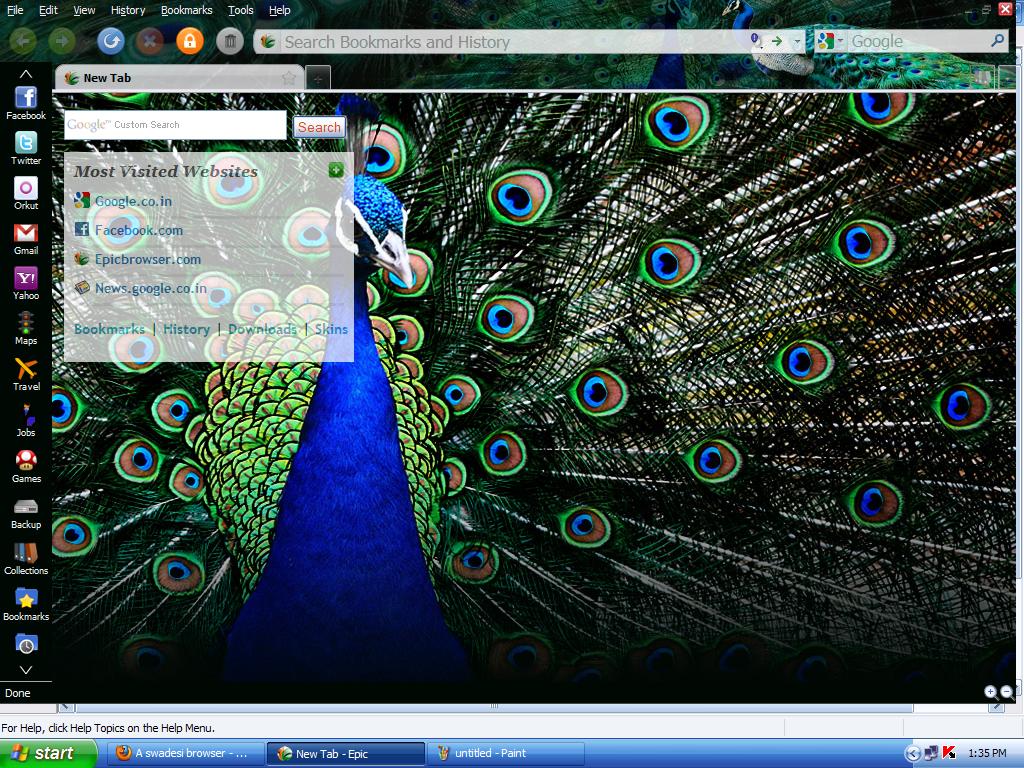
A swadesi browser

Tired of the Manga comic and James Bond themes on your browser? Well, now you can now go Desi and have Uttam Kumar or Mughal-e-Azam in the backdrop of your browser, all thanks to the Epic, the first truly Indian browser.
Don’t start thinking that the Epic is just some old browser tweaked with a bunch of Indian themes and skins. Actually, it is a bit more than a browser and seems to harbour ambitions of pushing your OS to the background, much like what the Google Chrome is planning for the world. This is evident from the fact that the browser is in full-screen mode in default. But then you realise that you don’t need to click the Start menu or the taskbar as most of what you need is there on the browser itself.

Alok Bhardwaj, CEO and Founder of Bangalore-based Hidden Reflex which developed the browser, says the browser is the most important and most-used software on a computer, but still hasn’t seen a design or functionality change in 15 years. So while browsers like Firefox, Flock and Songbird have been trying to add unique functions to the browser, Epic has gone a step ahead by giving users one-click access to most of what they would do on a computer.
Epic’s biggest tool towards this end is the sidebar, a concept that seems to be making its debut with the browser. The sidebar features almost everything you need, even access to My Computer, a ‘To do’ and Timer application, customised apps and even an inbuilt anti-virus. 

But the flavour of the browser is definitely India. Alok says, “We felt the browser should do more for you and decided to focus on delivering a product especially for the Indian market. One key inspiration was to develop a tool that could help Indian language conversation move online. At present, almost all Indian Internet activity is limited to English, but with Epic, Hindi and regional language speakers can effortlessly share their thoughts online.”
This is where the Indic text capabilities come into play. Every time you type something on the browser, a drop box appears on the right giving you the option of transliterating the text into 12 Indian languages. “India is our USP. Users can chat, send e-mails, search, post comments and do everything in Indian languages using Epic,” explains Alok, a former Wall Street investment banker who founded Hidden Reflex in 2007 inspired by the open source model.
Since the browser also features a full-fledged word processing software, you can write in English and get the text transliterated to a language of your choice. “We built Epic Write because it just makes sense. You do all your research online and when you find something, the normal browser is inefficient as you have to copy, minimise browser, maximise Word and paste. In Epic, you just have to highlight the text and drag and drop it into the Epic Write tab,” explains Alok.
The browser also gives you Indian content on a platter. The India button on the top of the sidebar provides access to top news stories, trending topics and much more.
If that was not enough, there is the option of adding hundreds of local news, business and entertainment apps. “We have around 1,500 Indian themes and wallpapers representing every state and all aspects of our culture and society,” says Alok. Since, the Epic is powered by Mozilla, the 10,000-odd add-ons used for Firefox can be installed here too. The file back-up, web snippets, video playlists and other such user-friendly feature is also likely to find many takers.

For social networking junkies, and there seems to be quite a few of them these days, there are buttons and apps that link you directly to Facebook, Twitter and other sites. The apps display feeds and updates from the sites in a smaller sidebar on the left and hence there is no need to open them separately.
The other focus is on security and privacy. “Epic includes on-demand anti-virus scanning which can scan your whole system for viruses and malware as well as automated scanning of downloaded files. Epic provides anti-phishing protection via a bigger address bar with a bold domain name which helps users discern if they’re at citibank.com or citiphishingsite.com. Epic also warns users when they’re about to visit a potentially dangerous website,” says Alok.
Then there is the one-click private data deletion button which also deletes Flash cookies, “the only browser that does so”. You can also shift to private browsing mode with the button on top.

Hidden Reflex claims there have had over 1.5 lakh downloads in the first five days of the launch. “We’re overwhelmed by the support we’ve received from India! Every three seconds someone in India is downloading Epic. ‘Epic browser’ and ‘Epic browser download’ have also been top search terms in India on Google and Yahoo,” Alok exults.
And from what we have seen so far, it’s time for the World to go Desi.

Sunday, July 18, 2010

When looks matter

Looks have always been one of its plus points. So much so, that if the laptop box has cow spots on it, you know there is a Gateway inside. This cult American company might now be part of an Asian success story called Acer, but that doesn’t mean it has let go its style.
One look at a Gateway laptop and you know there is a conscious effort to be different. For instance, the chrome feel, the distinct metallic look, all try and give the NV 49 an edge, at least when it comes to appearance. But looks can be deceiving, well, not always in a negative sense. For inside the all the chrome-induced brawn is a computer that works its heart out, a computer which know that just looks won’t get it anywhere in today’s world. 
To realise this all you have to do is work on the NV49 for a few minutes. The new Intel Core i3-350M processor along with the 3 GB DDR3 system memory try their best to rise up to all your expectations. The 14.0" HD 1366 x 768 pixel resolution LCD is also up to the task, thanks to Intel HD Graphics9 software. Though this is another laptop where the speakers are not what they should be – it’s time everyone made Mac the standard for sound – you will definitely enjoy watching movies on the cinematic 16:9 view.
But where this Gateway laptop scores over many of its competitors is with its proprietary Social Networks software. For those of you who have used the Flock browser, the interface will be familiar, for others this is a one-stop-shop for all you social networking needs. The application puts all your connections like Facebook, Flickr and YouTube in a messenger-like interface, letting you be a step ahead of your contacts, always.
The Windows 7 Home Premium 64-bit too does its bit to ensure a good user experience. For a change the keyboards are not plasticky and hence have a good feel about them. Another nice touch is the multi-gesture touchpad which has been amalgamated into the metallic wrist-rest. There is an HDMI port as well as three USB ports for you connection needs and 320 GB HDD memory. To put it straight, the Gateway NV presents you another affordable option if you are looking for a dependable laptop.
But why has Acer bought in competition for itself? Acer India’s Chief Marketing Officer S Rajendran believes Gateway differentiates itself with its “uniquely styled products, equipped with state of the art technology”. He says all Acer wants to do is give Indian consumers access to high-quality technology-rich American products. But whether the Indian consumer accepts this American sweetheart only time will tell.
The Gateway NV49 is priced Rs 37,799.
Z8T74ENCAMPG

The smart projector

A projector that can bring 3D to your home? Now, that's worth a look
Everyone these days wants a slice of the three-dimensional pie. Viewsonic too can’t afford to be left out and has come out with the PJD6381 3D-ready projector which uses the state-of-the-art DLP technology from Texas Instruments.

But don’t confuse this with a 3D projector, for this can’t convert existing content to three-dimension. But it does a decent job of reproducing 3D images and video, provided you have a good pair for polariser glasses – the old plastic red-blue goggles is just not as good. It is better to use the 3D as an additional feature, maybe to show off to friends or watch a movie, if you manage to get the required content.
Another thing that sets this projector apart is its extreme short throw ratio. This one can produce a 50-inch image from just 27-inches away. Which means you can literally project on to your wall from your computer table and get rid of the monitor. 

There are many presentation modes to choose from. While the movie mode gives a theatre like quality to the images, the daylight mode allows you to make sense of the display even in a bright room. Despite the 2,500 ANSI lumens projection power, the unit weighs just 2.68kg and boasts of a high 2400:1 contrast ratio.
The unit comes with two 5W speakers, which will be handy if you are watching a movie. There is a full-function remote with the kit, which also has a laser pointer to help you with presentations. The remote also has a backlit option to guide you in dark rooms.

The unit can project from multiple sources, automatically selecting which one has content that needs to be displayed. On the flip side, unlike earlier offerings from Viewsonic, this one does not sport an iPod dock and can’t project directly from USB or flash drives.
The Eco Mode, which has of late become a standard in projectors, extends the lamp life by up to 6,000 hours and drastically reduces noise output. The new off-to-go feature lets users simply unplug the projector and go without waiting for the usual cool down period. This also protects lamp life from sudden power blackout.
The Viewsonic PJD6381 projector costs Rs 66,399.


What is DLP?
The DLP projection system owes its powers to an optical semiconductor known as the DLP chip, invented by Dr Larry Hornbeck of Texas Instruments in 1987. Arguably the world's most sophisticated light switch, the DLP chip contains a rectangular array of up to 2 million hinge-mounted microscopic mirrors, each of which measure less than one-fifth the width of a human hair. When a DLP chip is coordinated with a digital video or graphic signal, a light source, and a projection lens, its mirrors can reflect a digital image onto a screen or other surface. The DLP chip combined with the advanced electronics that surround it produce stunning images and video that have redefined picture quality.

Saturday, July 3, 2010

Fluid pleasure

Nothing compares to the pleasure of using a Mac, if you can afford it
THERE are times when even writers find themselves at a loss for words. For me, one of those moments came when I was fiddling around with the new upgraded 17” MacBook Pro. If there is one word that can summarise a Mac, it has to be fluid – from the unibody design to the lightning fast OS X Snow Leopard, everything about the MacBook has a liquid quality to it.

But before I go more gaga over this aluminum dream box, let me alert you that buying one of these is like getting yourself a yacht. It’s great to ride and show off, but you need to have serious moolah to even get to the wharf where it is anchored. Plus, if you are really attached to your Windows PC, an Apple might actually land you up in front of a doctor. The OS is very different from Windows, and despite its ease-of-use, takes some getting used to. But this is also the sort of thing you would want to get used to once you get a feel of it. 
The MacBook Pro might not be the thing for regular PC users, but if you are a photographer, graphic artist, musician or painter, this is as close to the Holy Grail as you can be. With the 2.53 GHz Intel Core i5 with 3MB shared L3 cache and Apple’s new automatic graphics switching technology that toggles seamlessly between powerful NVIDIA GeForce GT 330M and energy efficient Intel HD Graphics processors, this one renders pictures and graphics like no others. Pictures from my Digital SLR, which take half a minute to load on regular PCs, were zipping through in the iPhoto slideshow and clearer than I have ever seen them before. In fact, Mac claims its new Pro 15” and 17” are “50 per cent faster than the previous systems” – it sure feels so, especially during start-up and shut down.  
Push a DVD into the slot drive and you get another feel of this fluidity. While running a movie, push the cursor to the top of the screen to make a filmstrip of the chapters appear. You can just click the screenshots to jump to the part of the movie you want to see, with not even a second’s lag.
Then this also has the best pair of speakers I have ever encountered on a laptop. Even the constant drone of the vuvuzelas from the TV behind could not drown out the dialogues of the movie playing on the Mac.

If that doesn’t impress you, there is the glass Multi-Touch trackpad and illuminated keyboard, nestled in the midst of some serious wrist space, to give you second thoughts. The 17-inch widescreen LED-backlit 1920 x 1200 glossy display means there is also extra large real estate facing it. Then there is the built-in, 95WHr lithium polymer battery; which Apple promises can deliver “up to 10 hours of wireless productivity on a single charge and up to 1,000 recharges”. 
The 17” version features a 4GB 1066 MHz DDR3 SDRAM, expandable to 8GB, 500GB serial ATA hard drive with Sudden Motion Sensor, AirPort Extreme 802.11n wireless networking, Gigabit Ethernet port, a state-of-the art iSight video camera and three USB 2.0 ports for connectivity options. All you have to do now is apply for a bank loan so that you can pay Rs 1.36 lakh to get hold of this wonder machine. 

By the Taj


By the Taj
Originally uploaded by kamikazengp
I consider this among my best pics

Sunday, June 27, 2010

Going Beyond

The15x optical zoom, HD video capability makes Samsung’s WB600 special
This is a camera which is built to perform — more like a hummer than a Ferrari — and feels heavy in your hand – it weighs around 210 gram — unlike the many paper-thin point-n-shoots in the market. With a 12 mega pixel sensor and 3.9 ~ 58.5mm Schneider lens that gives a 24mm ultra wide-angle, this camera can capture more than wide smiles. The 15x optical zoom, for instance, lets you do a detailed recce of the craters on the moon sitting in your balcony. On the other side, it can also give an excellent macro shot if the need arises.

The Dual Image Stabilisation reduces the shake — often unavoidable while using the zoom — that can ruin your image. If you think the auto modes, and there are quite a lot of them, don’t let you have the fun of deciding how your photo should turn out, you can always switch to the full manual mode where you get to set all the parameters. If that’s a bit too much for you, choose the aperture or shutter priority modes where you adjust just the aperture or shutter speed while the camera sets up the rest. 
To ensure that you get to see what you have captured there is a 3.0” LCD with improved contrast and colour reproduction. The camera also offers a wide range of scene modes, among them a new text mode for making copies of documents. There is also a separate mode to click portraits, and if you want the camera will remove your moles and warts for you. If that is not enough, the menu offers you access to filters that give the photos the feel of miniatures or vignettes. There is even a fish-eye filter, which, however, I found a bit disappointing.  
Then there is the HD 720p quality video at 30 frames per second, enough to make your clips a hit on YouTube. The Smart Auto 2.0, for both still and movies, instantly analyses elements of your composition and adjusts to capture the perfect shot. Another good thing is the video button which lets you shoot a video with a single click without switching over to the movie mode. The inbuilt microphone complements the camera wonderfully and you won’t miss out the family jokes. There is also a HDMI port so that you can play the hi-definition videos directly on to your TV.
The WB600 costs Rs 19,990, and if you ask me it’s worth every penny.