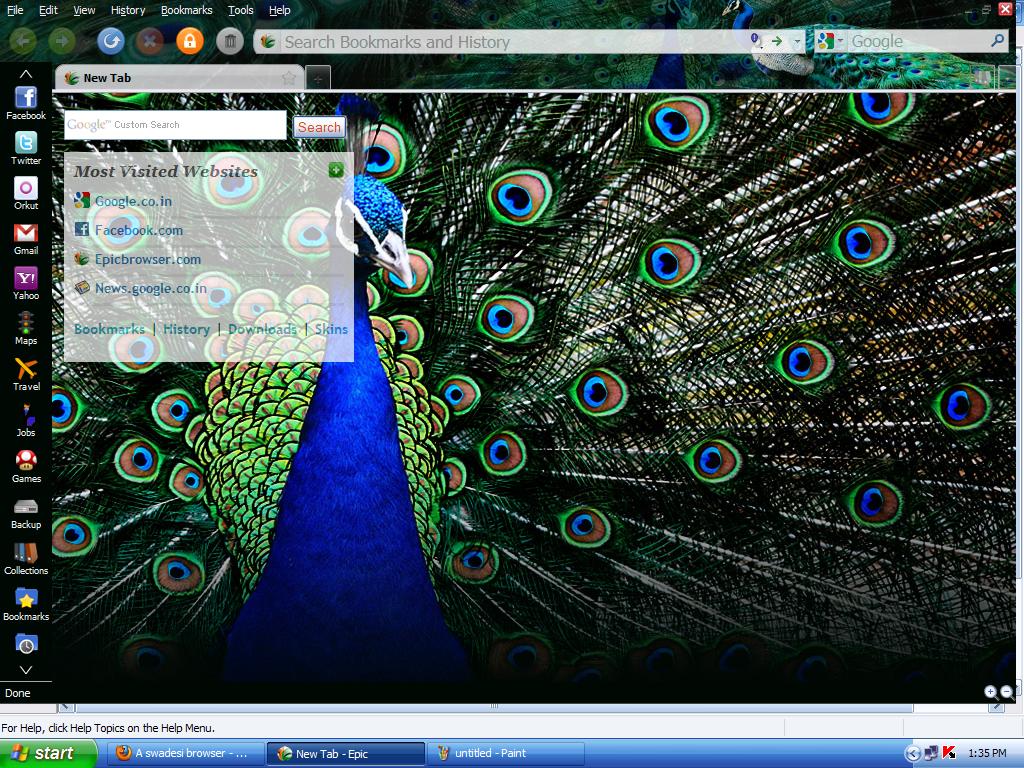
Don’t start thinking that the Epic is just some old browser tweaked with a bunch of Indian themes and skins. Actually, it is a bit more than a browser and seems to harbour ambitions of pushing your OS to the background, much like what the Google Chrome is planning for the world. This is evident from the fact that the browser is in full-screen mode in default. But then you realise that you don’t need to click the Start menu or the taskbar as most of what you need is there on the browser itself.
Alok Bhardwaj, CEO and Founder of Bangalore-based Hidden Reflex which developed the browser, says the browser is the most important and most-used software on a computer, but still hasn’t seen a design or functionality change in 15 years. So while browsers like Firefox, Flock and Songbird have been trying to add unique functions to the browser, Epic has gone a step ahead by giving users one-click access to most of what they would do on a computer.
Epic’s biggest tool towards this end is the sidebar, a concept that seems to be making its debut with the browser. The sidebar features almost everything you need, even access to My Computer, a ‘To do’ and Timer application, customised apps and even an inbuilt anti-virus.
But the flavour of the browser is definitely India. Alok says, “We felt the browser should do more for you and decided to focus on delivering a product especially for the Indian market. One key inspiration was to develop a tool that could help Indian language conversation move online. At present, almost all Indian Internet activity is limited to English, but with Epic, Hindi and regional language speakers can effortlessly share their thoughts online.”
This is where the Indic text capabilities come into play. Every time you type something on the browser, a drop box appears on the right giving you the option of transliterating the text into 12 Indian languages. “India is our USP. Users can chat, send e-mails, search, post comments and do everything in Indian languages using Epic,” explains Alok, a former Wall Street investment banker who founded Hidden Reflex in 2007 inspired by the open source model.
Since the browser also features a full-fledged word processing software, you can write in English and get the text transliterated to a language of your choice. “We built Epic Write because it just makes sense. You do all your research online and when you find something, the normal browser is inefficient as you have to copy, minimise browser, maximise Word and paste. In Epic, you just have to highlight the text and drag and drop it into the Epic Write tab,” explains Alok.
The browser also gives you Indian content on a platter. The India button on the top of the sidebar provides access to top news stories, trending topics and much more.
If that was not enough, there is the option of adding hundreds of local news, business and entertainment apps. “We have around 1,500 Indian themes and wallpapers representing every state and all aspects of our culture and society,” says Alok. Since, the Epic is powered by Mozilla, the 10,000-odd add-ons used for Firefox can be installed here too. The file back-up, web snippets, video playlists and other such user-friendly feature is also likely to find many takers.
For social networking junkies, and there seems to be quite a few of them these days, there are buttons and apps that link you directly to Facebook, Twitter and other sites. The apps display feeds and updates from the sites in a smaller sidebar on the left and hence there is no need to open them separately.
The other focus is on security and privacy. “Epic includes on-demand anti-virus scanning which can scan your whole system for viruses and malware as well as automated scanning of downloaded files. Epic provides anti-phishing protection via a bigger address bar with a bold domain name which helps users discern if they’re at citibank.com or citiphishingsite.com. Epic also warns users when they’re about to visit a potentially dangerous website,” says Alok.
Then there is the one-click private data deletion button which also deletes Flash cookies, “the only browser that does so”. You can also shift to private browsing mode with the button on top.
Hidden Reflex claims there have had over 1.5 lakh downloads in the first five days of the launch. “We’re overwhelmed by the support we’ve received from India! Every three seconds someone in India is downloading Epic. ‘Epic browser’ and ‘Epic browser download’ have also been top search terms in India on Google and Yahoo,” Alok exults.
And from what we have seen so far, it’s time for the World to go Desi.


