Showing posts with label google. Show all posts

Saturday, September 25, 2010

The Mobile Navigator

The Google maps app for mobile leaves you with no excuses for getting lost.
 
Stuck in a train which just refused to reach Delhi, I started fiddling with the apps on my Nokia E63. Curious to know where I was, I switched on the Google Maps app which I had downloaded recently. My phone doesn’t have GPS and I was definitely not near a city from what I saw through the blue glass windows, yet the app plotted my exact location on the map — I was 20 km from Aligarh. As my fellow passengers tried to figure out where we had been stuck for the past two hours, I chipped in with my gyan, much to their surprise.
But the Google Maps app for mobile phones can get you far more than some brownie points on a forgotten Indian Railways express train. For instance, users in Delhi can get the app to show them how to get from Point A to Point B by the Metro. Along with telling you how much the journey will cost and how long it will take, the app also uses your location to direct you to the nearest Metro station. Sadly, I could not get the app to work in Kolkata, the other Indian city with a Metro network, or Mumbai which prides itself on its local train system. 
The app will, however, tell you road directions for anywhere in India. It plots the route on a map and gives you directions for the entire journey, telling you where to turn or which overbridge to take. In the big cities, it automatically factors in the traffic delays and tells you how long it will take to reach the destination—the accuracy of this feature is debatable though. It can also plot alternative routes, in case you are stuck in a traffic jam. As a third option, you also get to know the shortest walking route with detailed directions.
In phones with built-in GPS, the Google app can give other navigation devices a run for their money, with its voice output that reads out directions. As default the app shows locations on a map, you also have the option of switching to satellite view.
But the best feature of the app for me was its ‘My Location’ technology which shows where you are on a map using the nearest cell phone towers. This was correct to a few metres every time I checked, even in interior Uttar Pradesh and Jharkhand.
The app lets you use keys on your phone to zoom in on the map and find businesses that have been tagged, but there are not many tagged in Indian cities for now. In the US, the app can plot all the nearby restaurants and even pop up their contact details. In India, you can use the ‘Layers’ feature to see important marking on the map like airports, transit lines and so on.
Google Latitude, which lets you log in to your Google account and tell the world where you are at any given point of time, is also a part of the app. However, it is best left switched off in order to avoid embarrassing situations.
While the features available depend on the phone OS and your location, most basics are available on all phones. The good thing about this app, which is free like other apps from Google, is that you don’t actually need a smart phone to get it going. It works like a dream on cheaper phones too, provided you have a GPRS or WAP connection.
So, you don’t have an excuse for getting lost any more.

Sunday, November 22, 2009

First of the Androids

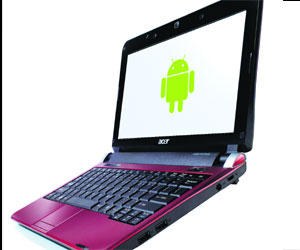
The Acer Aspire One D250 is the first Android netbook, but thank God it’s got XP too

We might still be waiting for Google’s Chrome OS, but the nearest thing, the Android, has finally made its way to a computer, though still in its made-for-phone format, through the 10.1” Acer Aspire One D250. This is the first Android-based netbook in India, but that doesn’t mean the early bird has caught the worm. In fact, you will soon realise the greatest feature of this netbook is that it has a dual operating system and comes bundled with Windows XP.

To start with, this is an Acer Aspire One with all its regular features, so I will rather concentrate on the Android which the unique thing about this netbook. The dual OS means users can switch between XP and Android at will, and if needed completely ignore the other. Out of the box, the first boot up is on XP. But right on the desktop there is an Android icon which lets you configure your other OS with your Google log-in. You have the option of switching to Android from the next time you fire up the netbook.

It is when you do this that you realise the real power of the Android. It takes all of 18 seconds to boot up—I checked it with a stopwatch and it didn’t take a second more—and take you to the home page; and it takes just three seconds to shut down. Then you don’t need double clicks with Android; a single press will do everywhere.

The home page, very similar to what you will find on the new Android phones, is devoid of any clutter. Firefox, Webmail, Google Talk and Calendar icons are given as default and you can add more with a simple right click to the add button. There is a dog-ear icon on the top left corner which will take you to the XP whenever you want, though the switch will take Windows time. There is a swipe-in icon on the right, as seen in many large-screen mobile phones, which will bring in the apps page. Here, too, you will find icons that you do on a mobile phone, including the all-important network manager which is the soul of this OS.

The fact is that the Android, as it is now, has been designed for super-fast Internet connectivity and the network manager lets you decide how you want to go about it— Wi-Fi, 3G, Bluetooth, LAN the pick is yours. “Android is a quick-in, quick-out OS—you don’t have to wait for a lengthy boot-up when all you want is to quickly get online to check something or send an email. All Internet connections established on the Android platform remain up and running even if you reboot the netbook or suspend the session,” explains S. Rajendran, CMO Acer India.

The PC automatically scans Wi-Fi networks and you will have no trouble logging in if you have a network at home and experiencing the powers of Instant On. However, I just couldn’t get it to recognise my Photon data card and was told by the company that I will have to download a driver to use it. Maybe companies should think of netbooks with built-in SIMs to unleash the Android.

If you plan to use the Android offline, be warned that it could be a pointless exercise. Unless you have media stored on to the OS from the Net there won’t be much you will be able to do here. I couldn’t even move photos taken using the webcam to a new folder, while there were no issues saving a file from the Net. Maybe there is a way to do this, but I couldn’t find it as there is no offline help module on the OS. But logged on to the Net there is nothing as powerful, and I suggest that you use the Android, if possible, only for surfing. The customised Firefox only makes things easier.

While in a nascent stage now, the Android is sure to gain popularity when developers start making free applications and widgets to be used on the OS. The day when there will be an app store available for Android users is not far, but till then it will be a bit of a bore for offline uses. Moreover, the applications, file saved in the XP are out of bounds when you are using Android. But Rajendran thinks this won’t put off users as they can easily switch back to XP to use the other software.
While the ease-of-use and speed factors will win Android a lot of fans, I would advise regular users to wait till it grows into a full-fledged OS. If you still want to take the plunge, make sure you have good Wi-Fi networks wherever you want to take your D250. But then, there is always the XP to fall back on.

What is the Android?
The Android is a mobile operating system running on the Linux kernel. It was initially developed by Google and later the Open Handset Alliance. It allows developers to write managed code in the Java language, controlling the device via Google-developed Java libraries. By the end of 2009 there will be at least 18 phone models using Android worldwide, according to Google. Some netbooks vendors like Acer are also taking the plunge.
Aspire One D250
Intel® Atom™ processor N280
Android™ and Windows® operating systems
10.1” SD 1024 x 600 (WSVGA) pixel resolution
1” thin and weighs 1.3 kg
Long-range WWAN (3G) broadband connection
Acer InviLink™ Nplify™ 802.11b/g/Draft-N or Acer InviLink™ 802.11b/g Wi-Fi CERTIFIED™ network
connection
Price: Rs 18,651

Sunday, July 19, 2009

Making sense of AdSense

Those of us who got bitten by the personal website bug in the early part of this decade will remember Google’s AdSense with some trepidation. Many new webmasters tried to monetise their blogs or websites with a disastrous effect, thanks to their limited knowledge of HTML codes, which then was essential to incorporate Google ads on to you webpage.

But things have changed, and for the better; putting AdSense on a website in now as easy as making it using Google’s Blogger platform. The AdSense link, which will throw up ads relevant to your page, can now be posted on the webpage like a picture or any other element. The ads that appear are unobtrusive and always relevant, plus Google does not believe in pop-up ads that will put off readers.

So what is AdSense? Google says it is an ad-serving program where website owners can enroll to enable text and image advertisements on their sites—”a goldmine of opportunity for web publishers to monetise their online presence”.

In simple words, owners of websites and blogs will get paid if those coming to your site clicks on the ads appearing on it. Well, there is a catch. The payment process starts only once the revenue threshold has been crossed — the threshold now is $100. While breaching this limit will take a popular website or blog just a few days, for amateur bloggers this could mean a very long wait — my blog hasn’t crossed $1 in the three years it has been online.

“AdSense is a free programme which delivers advertisements based on keywords on a website combining Google technology with its vast pool of advertisements,” explains Atul Satija, Head of Wireless Business, Japan & Asia-Pacific, Google. In fact, the Google ad network is the largest organised ecosystem to globally target and distribute online ads.

So what are the benefits of the AdSense programme. “Firstly, the ads start showing the moment you activate AdSense on you website. It is also cost effective since no sales teams are required to sell the ads or find the target websites,” he adds.

Supplementing the AdSense programme is AdWords which is a simple way to purchase highly targeted cost-per-click or cost-per-impression advertising, with the flexibility to set and modify the budget level. Remember how advertisements of national parties used to show beside your email or on websites during the recent elections campaign? Well, that was AdWords at work. However, Satija clarifies that putting an AdSense link on you page does not mean there will be more visitors or clicks. It will be entirely up to you to generate the content that will draw in readers.

So how do those opting for AdSense get to make money? Once a website crosses the threshold limit owners can ask Google to start paying them. “We send cheques or transfer money directly to bank accounts as Paypal is still not an option in India,” says Satija.

Google already has thousands of users in India and hopes the numbers will increase as more Indians start realising the potential of online advertising. And the potential is huge, for as per a Lintas media report, online advertising in India could be worth over Rs 2,500 crore by 2011.

Google has taken AdSense a step further by enabling the services for mobile sites as well as RSS feeds. While Google’s ad services are already enabled for regional websites, Satija says it is working on making its programmes more effective for the India’s multilingual audience.